
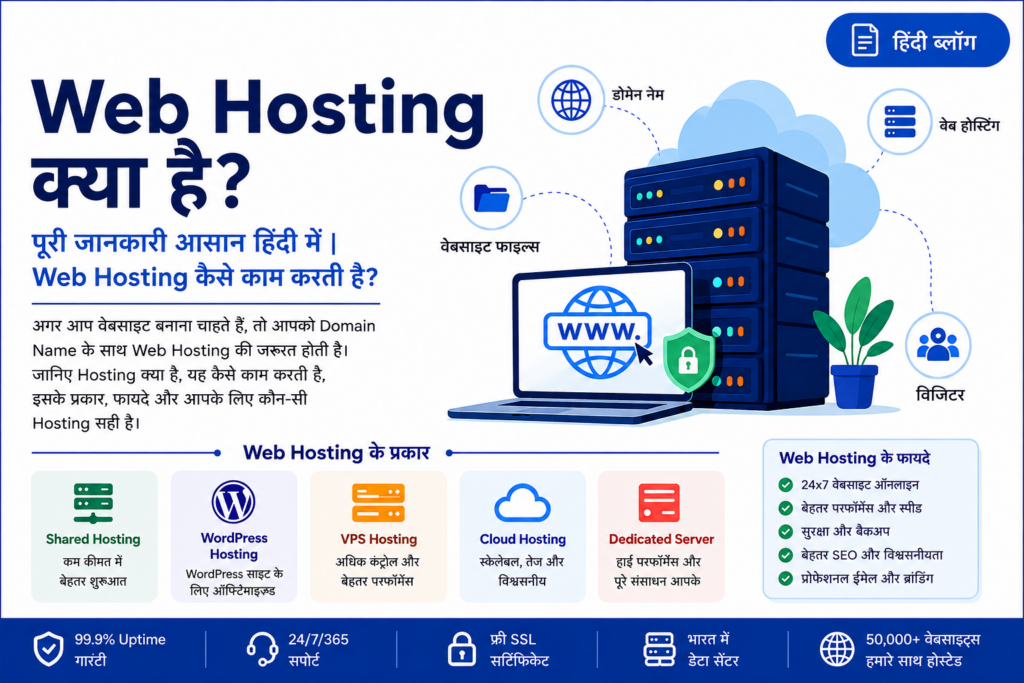

Web Hosting कैसे काम करती है?
क्या आप जानना चाहते हैं कि Web Hosting क्या है, यह कैसे काम करती है और आपकी वेबसाइट के लिए कौन-सी Hosting सही है?
अगर आप Website, Blog, Online Store, Business Website या Web Application शुरू करना चाहते हैं, तो Domain Name के साथ Web Hosting की जरूरत होती है।
सरल शब्दों में, Web Hosting वह service है जहाँ आपकी वेबसाइट की files, images, databases, emails और दूसरे website data को Internet-connected server पर store किया जाता है, ताकि लोग आपकी website को 24×7 online access कर सकें।
इस complete guide में हम समझेंगे:
- Web Hosting क्या है?
- Web Hosting कैसे काम करती है?
- Domain और Hosting में क्या अंतर है?
- Web Hosting के कितने प्रकार हैं?
- Shared Hosting क्या है?
- VPS Hosting क्या है?
- Cloud Hosting क्या है?
- Dedicated Server क्या है?
- WordPress Hosting क्या है?
- Business के लिए कौन-सी Hosting सही है?
- Hosting खरीदते समय किन चीजों को देखना चाहिए?
- DotComServers Hosting क्यों consider कर सकते हैं?
Web Hosting क्या है?
Web Hosting एक ऐसी service है जो आपकी website को Internet पर उपलब्ध कराने के लिए server पर जगह और computing resources प्रदान करती है।
जब आप कोई website बनाते हैं, तो उसमें बहुत सारी files होती हैं—जैसे:
- HTML files
- CSS files
- JavaScript
- Images
- Videos
- Database
- Documents
- Website software
इन files को किसी ऐसे server पर रखना पड़ता है जो Internet से connected हो। जब कोई visitor आपके domain name को browser में खोलता है, तो DNS उस domain को संबंधित server से connect करता है और server website की files visitor के browser को भेज देता है।
आसान उदाहरण
मान लीजिए आप एक physical दुकान खोलना चाहते हैं।
Domain Name = दुकान का Address
Web Hosting = दुकान की जगह
Website = दुकान के अंदर रखा सामान
Server = वह infrastructure जहाँ आपकी दुकान चल रही है
इसलिए केवल Domain खरीदने से website online नहीं होती। Website की files को host करने के लिए Hosting भी चाहिए।
Web Hosting कैसे काम करती है?
Web Hosting का पूरा process काफी simple है।
Step 1: Domain Name
सबसे पहले आप अपना domain register करते हैं।
उदाहरण:
yourbusiness.in
या
yourcompany.com
Step 2: Hosting Server
इसके बाद आपकी website की files hosting server पर upload होती हैं।
Step 3: DNS Configuration
Domain को hosting server के IP address या appropriate DNS records से connect किया जाता है।
Step 4: Visitor Website खोलता है
जब कोई visitor browser में आपका domain enter करता है:
Domain → DNS → Hosting Server → Website Files → Visitor Browser
और website visitor के सामने दिखाई देती है।
Domain और Web Hosting में क्या अंतर है?
बहुत से beginners को Domain और Hosting के बीच confusion होता है।
| Domain Name | Web Hosting |
|---|---|
| Website का Internet address | Website की files रखने की जगह |
| Example: example.com | Server storage/resources |
| Visitor website का नाम type करता है | Server website content deliver करता है |
| Domain registration आवश्यक है | Website को online रखने के लिए hosting आवश्यक है |
आसान भाषा में:
Domain = Address
Hosting = House
दोनों अलग services हैं लेकिन website को online access कराने में दोनों की महत्वपूर्ण भूमिका होती है।
Web Hosting के मुख्य प्रकार
हर website की जरूरत अलग होती है। इसलिए अलग-अलग प्रकार की Hosting उपलब्ध होती है।
मुख्य Hosting types हैं:
- Shared Hosting
- WordPress Hosting
- VPS Hosting
- Cloud Hosting
- Dedicated Server Hosting
- Managed Hosting
अब इन्हें आसान भाषा में समझते हैं।
1. Shared Hosting क्या है?
Shared Hosting में एक physical server के resources को कई websites के बीच share किया जाता है।
यह beginners, छोटे blogs, portfolios और छोटे business websites के लिए एक affordable option हो सकता है।
Shared Hosting किसके लिए सही है?
- Personal Blog
- Small Business Website
- Portfolio Website
- Startup Website
- Small WordPress Website
- Basic Landing Page
Shared Hosting के फायदे
- कम cost
- आसान management
- Beginners के लिए suitable
- Technical knowledge कम होने पर भी इस्तेमाल करना आसान
- छोटे websites के लिए practical
DotComServers Shared Hosting
DotComServers अपनी website पर Shared Hosting को startups और growing websites के लिए position करता है। उसके current website information के अनुसार Shared Hosting plans ₹49/month से शुरू होते हैं। Actual pricing और features खरीदने से पहले official pricing page पर verify करना चाहिए।
2. WordPress Hosting क्या है?
अगर आपकी website WordPress पर बनी है, तो WordPress-oriented hosting एक convenient option हो सकती है।
WordPress Hosting में hosting environment को WordPress websites के लिए suitable बनाया जा सकता है।
यह उपयोगी हो सकती है:
- Business Website
- Blog
- News Website
- Portfolio
- Agency Website
- Small E-commerce Website
DotComServers अपनी website पर WordPress Hosting को WordPress performance, security और management के लिए optimized solution के रूप में प्रस्तुत करता है।
3. VPS Hosting क्या है?
VPS का पूरा नाम Virtual Private Server है।
VPS Hosting में एक physical server को virtualization technology की मदद से अलग-अलग virtual server environments में divide किया जाता है।
इससे customer को shared hosting की तुलना में ज्यादा control और dedicated resources मिल सकते हैं।
VPS Hosting किसके लिए सही है?
VPS उपयोगी हो सकता है:
- Growing Websites
- Web Applications
- Developers
- SaaS Applications
- E-commerce
- CRM Applications
- Business Applications
- Database-heavy applications
VPS Hosting के फायदे
- अधिक control
- Root access
- Scalable resources
- Dedicated virtual resources
- बेहतर isolation
- Custom software installation
- Linux/Windows options
DotComServers के current VPS offerings में Linux/Windows OS, full root access, dedicated IPv4, NVMe storage और Indian server options जैसे features listed हैं। Plans currently ₹299/month से शुरू होते हैं।
4. Cloud Hosting क्या है?
Cloud Hosting में infrastructure और computing resources को cloud environment के माध्यम से provide किया जाता है।
Traditional single-server setup की तुलना में cloud infrastructure applications को scale करने में flexibility दे सकता है।
Cloud Hosting useful हो सकती है:
- Growing Businesses
- High-traffic Websites
- SaaS Applications
- E-commerce Platforms
- Business Applications
- Scalable Web Projects
लेकिन Cloud Hosting चुनते समय केवल price नहीं देखना चाहिए।
आपको देखना चाहिए:
- CPU
- RAM
- Storage
- Network
- Backup
- Security
- Scalability
- Support
- Data center location
5. Dedicated Server क्या है?
Dedicated Server में पूरा physical server एक customer के लिए dedicated होता है।
इसलिए Dedicated Hosting आम तौर पर उन businesses और applications के लिए ज्यादा suitable होती है जिन्हें high performance, greater control या specific server resources की आवश्यकता होती है।
Dedicated Server किसके लिए सही है?
- High-traffic websites
- Large e-commerce websites
- Enterprise applications
- Large databases
- Resource-intensive applications
- High-performance workloads
Dedicated Server के फायदे
- Dedicated hardware
- High performance
- Full root access
- Greater customization
- Better resource isolation
- Large resource capacity
DotComServers की current Dedicated Server offering में full root access, 1 Gbps network options, DDoS protection, Linux/Windows OS और managed hosting addons जैसी सुविधाएँ listed हैं।
6. Managed Hosting क्या है?
अगर आपको server management का technical experience नहीं है, तो Managed Hosting useful हो सकती है।
Managed service में hosting provider server management के कई technical tasks में assistance प्रदान कर सकता है।
इनमें शामिल हो सकते हैं:
- Server monitoring
- OS management
- Security configuration
- Software installation
- Backup management
- Server optimization
- Migration
- Technical support
DotComServers अपनी VPS offering में Basic, Standard और Premium management options list करता है, जिनमें monitoring, security configuration, software management, backup assistance और migration जैसी services शामिल हैं।
कौन-सी Web Hosting आपके लिए सही है?
| आपकी जरूरत | Recommended Hosting |
| Personal Blog | Shared Hosting |
| Small Business Website | Shared / WordPress Hosting |
| WordPress Website | WordPress Hosting |
| Growing Website | VPS Hosting |
| Web Application | VPS / Cloud |
| E-commerce | VPS / Cloud |
| High-Traffic Website | Dedicated / Cloud |
| Enterprise Application | Dedicated / Cloud |
| Server Management नहीं आता | Managed Hosting |
ध्यान रखें कि यह एक general guideline है। सही hosting आपके traffic, application architecture, resource requirements और budget पर depend करती है।
Web Hosting खरीदते समय किन बातों का ध्यान रखें?
सिर्फ सबसे सस्ती hosting देखकर purchase करना सही approach नहीं है।
Hosting चुनते समय इन factors को जरूर check करें।
1. Server Performance
CPU, RAM, storage technology और network capacity website performance को प्रभावित कर सकते हैं।
2. Storage
Website के size और application requirements के हिसाब से storage चुनें।
NVMe SSD जैसी technologies high-performance workloads के लिए useful हो सकती हैं।
3. Uptime
Hosting provider की uptime commitment देखें।
DotComServers अपनी website पर अलग-अलग hosting services के लिए uptime guarantees/claims list करता है; purchase करने से पहले applicable SLA और exact terms जरूर देखें।
4. Security
Check करें कि provider कौन-कौन से security features देता है:
- SSL
- Firewall
- Malware protection
- DDoS protection
- Security monitoring
- Backup options
5. Backup
Website का regular backup बहुत important है।
Server failure, accidental deletion या software problems की स्थिति में backup recovery में मदद कर सकता है।
6. Customer Support
Hosting issue होने पर fast technical support काफी important है।
DotComServers अपनी website पर 24/7 support availability और chat/email support mention करता है।
7. Server Location
आपके target audience के करीब server location होने से network latency कम करने में मदद मिल सकती है।
Indian audience के लिए Indian hosting infrastructure एक option हो सकता है।
Web Hosting और SEO का क्या संबंध है?
Hosting खुद कोई magic SEO ranking factor नहीं है।
लेकिन hosting website के technical performance को प्रभावित कर सकती है।
उदाहरण के लिए:
- Slow server response
- Poor uptime
- Network problems
- Security issues
- Slow page loading
इनका user experience पर negative effect हो सकता है।
इसलिए SEO-friendly website के लिए केवल keywords ही नहीं, बल्कि:
Good Hosting + Fast Website + Mobile Optimization + Quality Content + Technical SEO + Security
इन सभी पर ध्यान देना चाहिए।
Website के लिए SSL Certificate क्यों जरूरी है?
SSL आपकी website और visitor के browser के बीच encrypted connection establish करने में मदद करता है।
इसी वजह से websites अक्सर:
http://
की जगह:
https://
का उपयोग करती हैं।
आज business website के लिए HTTPS practically essential है।
DotComServers अपनी hosting offerings में Free SSL Certificate को feature के रूप में list करता है।
क्या Hosting के बिना Website चल सकती है?
अगर website को public Internet पर accessible बनाना है, तो किसी प्रकार की hosting/server infrastructure की जरूरत होगी।
आप अपने personal computer को technically server की तरह configure कर सकते हैं, लेकिन production website के लिए यह आम तौर पर practical नहीं होता।
Professional hosting आपको server infrastructure, networking, security और support जैसे aspects manage करने में मदद करती है।
Hosting कितने की आती है?
Hosting की price provider, hosting type, resources, management level और billing period के अनुसार बदलती है।
उदाहरण के लिए, DotComServers की current website पर:
- Shared Hosting: ₹49/month से
- WordPress Hosting: ₹69/month से
- VPS Hosting: ₹299/month से
listed हैं।
Dedicated server pricing अलग resource configurations के अनुसार बदलती है।
Important: Hosting prices और promotional offers समय के साथ बदल सकते हैं। इसलिए order करने से पहले official DotComServers website पर current pricing, renewal price, taxes और plan limits जरूर check करें।